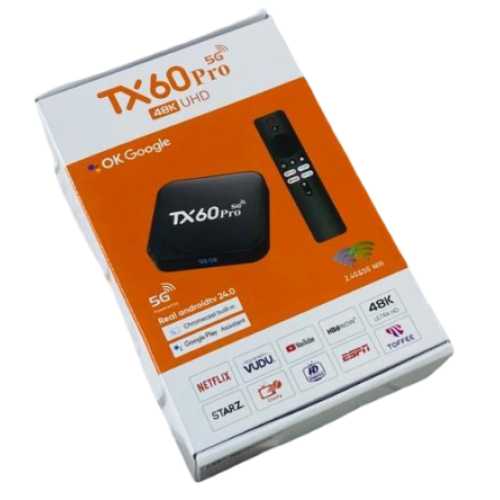
The Wave Tech TX60 Pro 5G Android TV Box is a practical way to add smart features to a compatible TV, monitor, or projector. It gives you access to apps, online entertainment, screen mirroring, Bluetooth devices, and other Android-based features from a single compact device.
With 16GB RAM, 256GB ROM, dual-band Wi-Fi, Bluetooth 5.0, a voice remote, Google Play Store, HDMI, AV, USB, TF card, and LAN connectivity, the TX60 Pro 5G TV Box is designed for everyday home entertainment.
If you are comparing the Android TV Box Price in Bangladesh or looking for an affordable TV Box Price in Bangladesh, this model can be a useful option for compatible displays.
Turn Your Regular TV into a Smart TV
One of the main advantages of an Android TV Box is that you don't necessarily need to replace your existing television to enjoy smart features. The Wave Tech TX60 Pro can connect to a compatible TV through HDMI and provide an Android-based interface.
It can also be used with compatible monitors and projectors. For older displays without HDMI, an appropriate AV connection or converter may be required depending on the display.
You can use the device for YouTube, supported streaming services, live TV applications, screen mirroring, social apps, and other applications available through the Google Play Store.
Smooth Everyday Performance with H313 Processor
The TX60 Pro 5G Android TV Box is powered by an Allwinner H313 Quad-Core processor with four Cortex-A53 cores. The device also supports a TF card, allowing you to expand storage with a compatible memory card.
Dual-Band Wi-Fi and Bluetooth 5.0
The built-in Wi-Fi supports 2.4GHz and 5GHz bands, giving you flexibility when connecting the TV Box to your home network.
Bluetooth 5.0 is also included, allowing you to connect compatible wireless accessories such as:
- Bluetooth speakers
- Headphones
- Earbuds
- Soundbars
This makes the TX60 Pro 5G TV Box convenient for watching entertainment without always relying on the TV's built-in audio system.
Voice Remote and Screen Mirroring
The Wave Tech TX60 Pro comes with a Bluetooth and voice remote, making navigation more convenient.
It also supports Miracast screen mirroring, which can be useful when you want to display compatible smartphone or other device content on a larger screen.
Entertainment and Streaming Apps
The TV Box supports popular entertainment platforms and applications. Depending on the service and current app compatibility, users can access platforms such as YouTube, Netflix, Disney+, Prime Video, and Toffee.
Some streaming services require an active subscription. Availability and app compatibility can also change over time, so users should check the relevant service requirements before purchasing.
The device can also support various live TV and sports applications. Claims such as “1000+ free live channels” depend on the specific application or service being used and should not be treated as a guaranteed built-in channel package.
Ports and Connectivity
The Wave Tech TX60 Pro provides several connection options for different home entertainment setups. Available ports include HDMI, USB, AV, TF card, and LAN.
This allows you to connect the TV Box to a compatible television or display while also providing options for wired networking, external storage, and compatible accessories.
Specification | Details |
Brand | Wave Tech |
Model | TX60 Pro 5G |
Product Type | Android TV Box |
Android Version | Android 16 |
Actual RAM | 2 GB |
Actual ROM | 16 GB |
Advertised Display Memory | 16GB / 256GB* |
Processor | Allwinner H313 Quad Core |
CPU | 4 × Cortex-A53 @ 1.30GHz |
Clock Speed | 480MHz |
GPU | ARM Mali-G31 |
Wi-Fi | 2.4GHz / 5GHz |
Bluetooth | Bluetooth 5.0 |
Screen Mirroring | Miracast |
Voice Remote | Yes |
Google Play Store | Supported |
TF Card | 4GB / 8GB / 16GB / 32GB / 64GB |
Ports | USB, TF, HDMI, AV, LAN |
Power Adapter | 5V / 2A |
Streaming Apps | YouTube, Netflix, Disney+, Prime Video, Toffee* |
Country of Origin | China |
Things to Check Before Buying
Before purchasing an Android TV Box, check the ports available on your TV or display. HDMI is the simplest connection option for compatible modern displays. If your display does not have HDMI, an appropriate AV cable or converter may be necessary.
Also remember that Netflix, Disney+, Prime Video, and other subscription-based services may require separate subscriptions, and not every application is guaranteed to work identically on every Android TV Box.